A few months ago, I moved back all my services from Hetzner to a home server. Hopefully that’s the beginning of a series of blog posts explaining my setup, including my cheap way to have an out of band access for the serial console and the power management.
First thing first, a server need Internet connectivity. FDN is providing the transit over a local fiber loop managed by Bouygues Telecom.
I had a hard time finding a proper configuration. At first I tried the ppp daemon provided by the base system, but the stability was poor. I had more success with the mpd5 port.
Topology summary
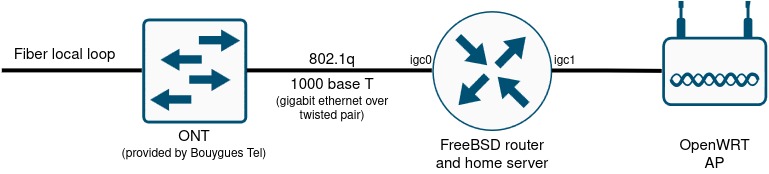
Physical topology
Connected directly to the fiber, I have an ONT provided by Bouygues Telecom. On one side, a SC female connector to plug the fiber. On the other side, an RJ45 connector provides Gigabit Ethernet.
That RJ45 port is connected to the first network interface of my FreeBSD server, which will act as a router.
A second network interface on the same FreeBSD server is connected to a wifi router running OpenWRT, and configured as a simple access point.
VLANs
The Gigabit Ethernet interface on the ONT is configured as a trunk port, providing the VLAN 4000 over 802.1q.
Authentication and L3 configuration
A PPPoE tunnel will be established between the FreeBSD server and the FDN network. It will handle the authentication, and the IPv4/IPv6 configuration.
Configuration
WAN interface configuration
On the FreeBSD server, we need to configure the WAN physical interface, with a VLAN subinterface. I also deactivated most of the hardware offloading features.
The relevant lines in my /etc/rc.conf:
ifconfig_igc0="up -lro -tso -rxcsum -txcsum -txcsum6 -vlanmtu -vlanhwtag -vlanhwcsum -vlanhwtso"
vlans_igc0="vlan4001"
create_args_vlan4001="vlan 4001"
ifconfig_vlan4001="up"
To apply the configuration change:
/etc/rc.d/netif restart
PPPoE configuration
We should now have a working vlan connectivity to the ONT. We will establish a PPPoE session on it. Fist, install mpd5:
pkg install mpd5
Add the PPPoE section to the configuration file:
default:
        load pppoe_client

pppoe_client:
        create bundle static B1
        set bundle enable ipv6cp
        set iface route default
        set iface up-script /usr/local/etc/mpd5/linkup.sh
        set iface down-script /usr/local/etc/mpd5/linkdown.sh
        set ipcp ranges 0.0.0.0/0 0.0.0.0/0

        create link static L1 pppoe
        set link action bundle B1
        set auth authname <ISP_USERNAME>
        set auth password <ISP_PASSWORD>
        set link max-redial 0
        #set link mtu 1460
        set link keep-alive 10 60
        set pppoe iface vlan4001
        set pppoe service ""
        open
The linkup.sh and linkdown.sh will be run each time a session is open or closed. I use them to reload the PF rules, and to add a default IPv6 route.
/usr/local/etc/mpd5/linkup.sh:
#!/bin/sh
route -6 add default -iface ng0
/etc/rc.d/pf reload
/usr/local/etc/mpd5/linkdown.sh:
#!/bin/sh
route -6 del default -iface ng0
Remember to make those scripts executable:
chmod +x /usr/local/etc/mpd5/linkup.sh /usr/local/etc/mpd5/linkdown.sh
Enable the mpd5 daemon:
sysrc mpd_enable="YES"
Start the mpd5 daemon:
service mpd5 start
If everything worked, a new interface ng0 should be configured with a public IPv4 address and a link local IPv6 address.
LAN interface configuration
On my LAN interface, I configured a private IPv4 address, and an IPv6 address from the range provided my my ISP. I also deactivated the hardware offloading features. In /etc/rc.conf:
ifconfig_igc1="inet 192.168.0.1 netmask 255.255.255.0 -lro -tso -rxcsum -txcsum -txcsum6"
ifconfig_igc1_ipv6="inet6 2001:0DB8:1022::1 prefixlen 64"
Apply the configuration change:
/etc/rc.d/netif restart
NAT and MSS configuration
Finally, if we want IPv4 connectivity for the clients in the LAN, we need to NAT the outgoing traffic. We also have a small issue : PPPoE is a tunneling protocol, it uses additional headers. Therefore, we don’t have a standard 1500 MTU on the WAN interface. As the LAN clients are not aware of that, we need to alter the MSS during the TCP negociation to avoid fragmenting or breaking the TCP traffic. I’m using PF, here is the relevant configuration in /etc/pf.conf:
ext_if=ng0
lan1_if=igc1
lan1_net=$lan1_if:network
# scrub and fix the MSS on the WAN interface
scrub on $ext_if all max-mss 1412
# NAT from lan to internet
nat on $ext_if from $lan1_net to any -> ($ext_if)